
- Home
- Nveloop POS
Nveloop POS: Cloud POS for Restaurants, Pharmacies, Supermarkets & Retail
One POS for every shop you run: from a single kottu counter to a 15-branch chain.
Offline-ready · Multi-branch · VAT-ready · Made for Sri Lanka & the Gulf
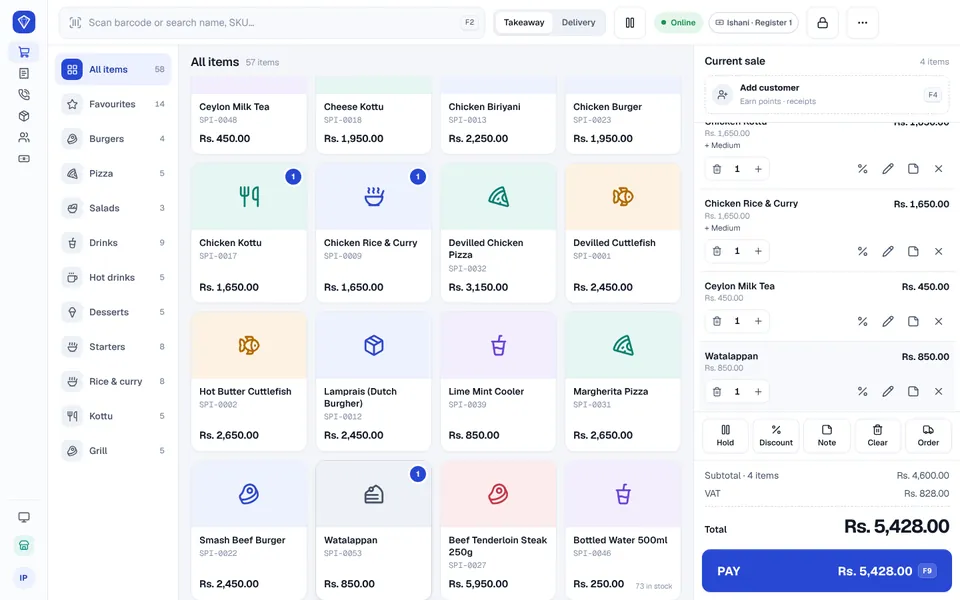
Sell faster
Short queues, quick bills.
Control every branch
All your shops in one view.
Works offline
Keeps selling without internet.
Know your numbers
Sales, profit and cash, daily.
Choose your type of business
Nveloop POS is set up for the way your trade works. Pick yours to see what it can do for you.
Restaurant & Café POS
Restaurants, cafés and hotel dining
Learn moreFast Food, Takeaway & Delivery POS
Takeaways, kottu shops and delivery kitchens
Learn moreSupermarket & Grocery POS
Supermarkets, groceries and mini-marts
Learn morePharmacy POS Software
Pharmacies and medical stores
Learn moreMobile Phone & Electronics POS
Mobile phone, computer and electronics shops
Learn moreClothing & Fashion Store POS
Clothing, textile and footwear shops
Learn moreHardware Store POS
Hardware, building supplies and paint shops
Learn moreBakery POS
Bakeries, pastry and cake shops
Learn moreJewellery Shop POS
Jewellers and gem shops
Learn moreBookshop & Stationery POS
Bookshops, stationery and printing services
Learn moreBeauty & Cosmetics Shop POS
Beauty, cosmetics and fragrance stores
Learn moreEverything your counter needs, in one place
Sell
A fast, simple register with every local payment method.
Stock
Know what you have in every branch, and what to reorder.
Customers
Loyalty, credit accounts and promotions that bring people back.
Control
Manager approvals and a record of every important action.
Orders & delivery
Phone, WhatsApp and delivery orders in one place.
Reports
Sales, profit and cash for every day and every branch.
A POS that already speaks your market
Rupees and dirhams, VAT and tax invoices, LankaQR, cheques, credit customers, service charge and gold per pawn — built in from day one, not added later.
- Works in LKR, and in AED for the Gulf
- VAT and tax invoices
- Cash, card, LankaQR, bank transfer, cheque and credit
- Set-up, training and support from our team in Sri Lanka
Works offline
Keeps selling when the internet drops and syncs on its own.
One shop or many
Every branch and register under one owner login.
Made for Sri Lanka
Rupees, VAT, tax invoices, LankaQR, cheques and local habits.
Local support
Set-up, training and help from our team in Sri Lanka.
Selling in three steps
- 1
We set you up
We create your company, branches and staff.
- 2
Load your products
Import them from Excel, or start with a ready sample catalogue for your business type.
- 3
Start selling
Plug in your printer and scanner and open the register.
Check every branch from your phone
Each branch runs its own registers and staff. As the owner you see all of them together — sales, stock and cash — wherever you are.
- Per-branch stock
- Per-branch prices
- Staff access by branch
- Owner view on any phone
Works with the hardware you can buy today
No special terminal needed. Nveloop POS runs in a browser on a Windows PC, POS terminal, Android tablet, iPad or phone.
- Receipt printers (ESC/POS)
- Kitchen printers
- Cash drawers
- Barcode scanners
- Label printers
- Weighing scales
- Staff RFID cards
- Customer displays
Want the full feature list?
Our product brochure and user manual are shared with businesses during a demo. Ask us and we will walk you through everything Nveloop POS does for your type of shop.
Nveloop POS questions
Pricing depends on your business type and how many branches and registers you run. Contact us for a tailored quote.
Does Nveloop POS work without internet?
Yes. The register keeps selling when the internet drops and syncs automatically when the connection comes back, with no duplicate sales.
Can I manage multiple branches?
Yes. Each branch has its own stock, prices, staff and reports, and the owner can see every branch together, including from a phone.
Which types of business is it for?
Restaurants and cafés, fast food and delivery, supermarkets and groceries, pharmacies, mobile phone and electronics shops, clothing stores, hardware stores, bakeries, jewellers, bookshops and beauty stores.
Does it support VAT and LankaQR?
Yes. It works in Sri Lankan rupees with VAT and tax invoices, and takes cash, card, LankaQR, bank transfer, cheque and credit. It also works in UAE dirhams for the Gulf.
Which printers and scanners work with it?
Standard receipt printers, kitchen printers, cash drawers, barcode scanners, label printers and weighing scales sold by local POS suppliers.
Can I see the full feature list?
Yes. We share our product brochure and user manual during a free demo, set up for your type of business.
How much does it cost?
Pricing depends on your business type and how many branches and registers you run. Contact us for a tailored quote.
See Nveloop POS with your own business type
Tell us what you sell and how many branches you run. We will show you Nveloop POS set up for your kind of shop.
Contact us for a tailored quote · Sri Lanka & USA offices